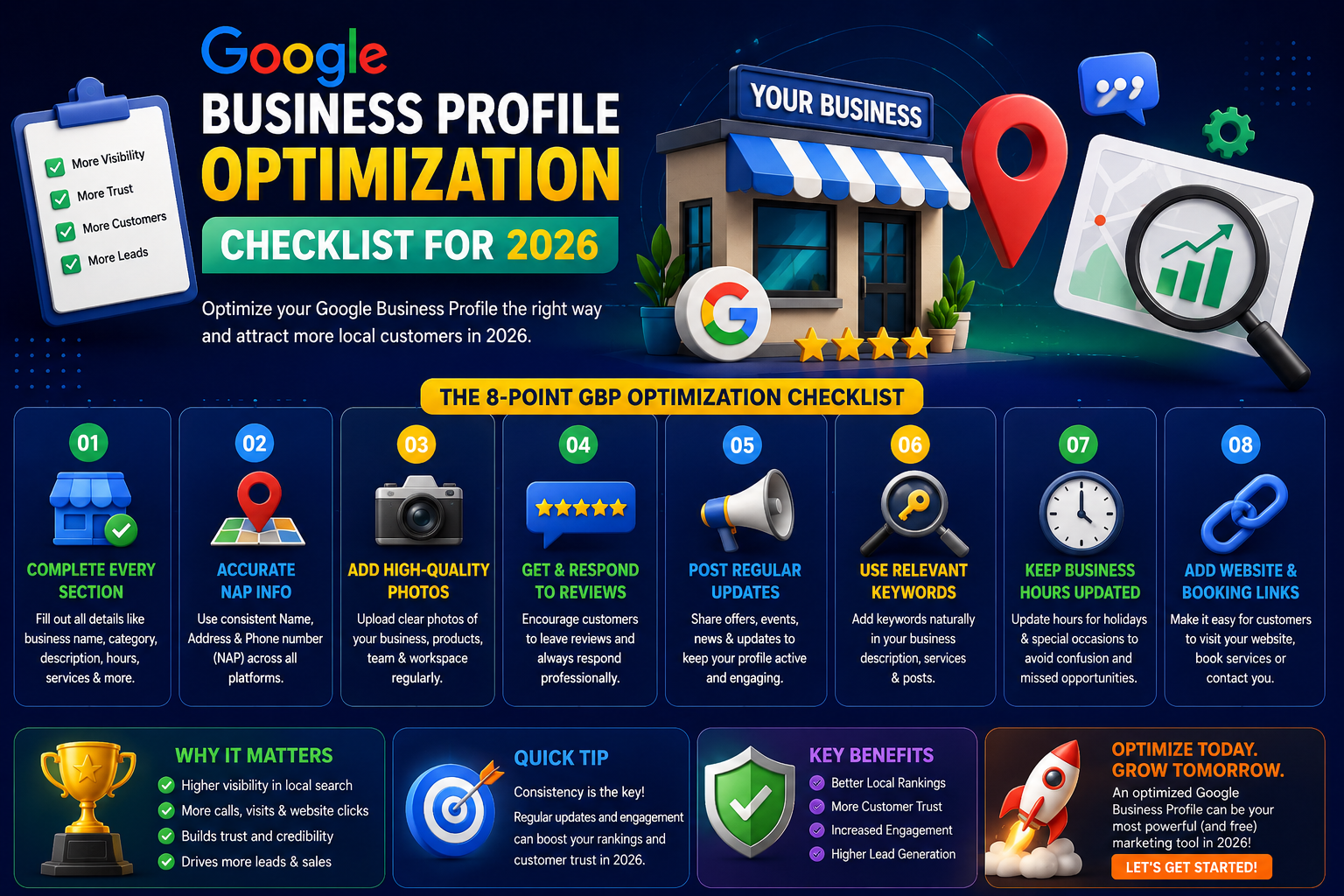
Google Business Profile Optimization Checklist for 2026: The Complete Guide for Indian Small Businesses
By a local SEO consultant with 10+ years of experience auditing and optimising Google Business Profiles for small and medium businesses across Gujarat and India.
There is a sweet shop in Maninagar, Ahmedabad, that has been making the same sev mamra and mohanthal recipe for three generations. The current owner, Jayeshbhai, took over from his father in 2002. During Diwali and Navratri, people queue outside the door. The rest of the year, footfall had been quietly falling — and Jayeshbhai could not understand why.
His nephew had set up a Google Business Profile two years earlier. Three photos. An address. That was it.
One evening I searched "mithai shop near Maninagar." An eight-month-old competitor was sitting at the top of Google's local results. Jayeshbhai's shop — 22 years of history, a loyal customer base, a genuinely better product — was buried on page two.
The difference was not quality. It was not marketing budget. It was a properly managed Google Business Profile versus one that had been abandoned after setup.
This checklist documents exactly what we did to fix that — and everything your business needs to do the same. It is built on Google's own published guidelines for local ranking, current best practices verified through direct testing across Gujarat business accounts, and real outcomes from businesses I have worked with across Ahmedabad, Surat, Vadodara, Rajkot, and Gandhinagar.
What Google Actually Says About Local Ranking — And Why It Matters
Before touching any settings, it helps to understand how Google decides which businesses to show in local results. Google has published its local ranking factors publicly, and they come down to three variables: Relevance, Distance, and Prominence.
- Relevance — how well your profile matches what someone is searching for
- Distance — how physically close your business is to the searcher
- Prominence — how well-known and trusted Google considers your business to be, based on reviews, backlinks, mentions, and profile activity
You cannot change where your business is physically located. But you can significantly improve relevance and prominence — and that is exactly what this checklist addresses.
What the data shows: According to Google's own research, businesses with complete and optimised profiles are 70% more likely to attract location visits and 50% more likely to be considered for purchase compared to those with incomplete listings. BrightLocal's 2024 Local Consumer Review Survey found that 98% of people read online reviews before visiting a local business — and 49% trust them as much as a personal recommendation. These are not marginal numbers. For a medical clinic in Anand or a packaging supplier in Vatva, the difference between a fully optimised listing and an abandoned one is often the difference between the phone ringing and not.
Part One: Building the Right Foundation
In over ten years of auditing local business listings across India, I have seen the same problem more times than I can count: a listing set up quickly in 2019 or 2020, never revisited, gradually accumulating wrong information and missing opportunities while the business owner assumed it was "fine."
It usually is not fine. Here is how to make it actually work.
Step 1: Claim, Verify, and Secure Your Listing
Go to business.google.com and search your business name before creating anything. Google auto-generates listings from public directories and map data — your business may already exist in some form, possibly with incorrect information that any member of the public can "suggest edits" to.
If it exists, claim it. If it does not, create it.
Verification in 2026: Google has significantly expanded video verification over the past 18 months. For many new or recently updated listings, you will be asked to record a short video walkthrough — your shop exterior with visible signage, the interior of your premises, and a clear view of your business operating. This typically takes under five minutes. Do it on a weekday when your premises look as they normally would during business hours.
For businesses that receive the postcard option, allow 5–14 days. Do not request a second postcard before the first has arrived — each new request cancels the previous code and restarts the clock.
Why verification is non-negotiable: An unverified listing can be edited by third parties. More importantly, Google's local ranking algorithm treats unverified listings differently — they are significantly less likely to appear in competitive map pack positions regardless of how well the rest of the profile is completed.
Implementation tip: After verifying, immediately turn on two-factor authentication for the Google account managing your GBP. Listing hijacking — where a competitor or bad actor claims ownership of your listing — does happen, and it is extremely difficult to reverse quickly. A verified, secured listing is far less vulnerable.
Step 2: Complete Every Available Field
Google's algorithm rewards profile completeness. A listing with 60–70% of fields filled consistently ranks below a comparable listing that is 100% complete. This is not speculation — it is documented in Google's own guidance on how they evaluate local business profiles.
The fields most commonly left empty — and which carry the most ranking and trust value:
Business hours including special hours for major Indian festivals. A listing that shows no hours on Diwali looks closed to every customer who checks. Update your special hours for at minimum: Diwali, Navratri, Eid, Holi, Dussehra, and any regional Gujarat holidays relevant to your business.
Opening date is underused and undervalued. It tells both Google and visitors how long your business has been operating. For a business like Jayeshbhai's with 22 years of history, this is a credibility signal that new competitors simply cannot match.
Attributes are the granular checkboxes most people skip entirely: "accepts UPI payments," "wheelchair accessible," "women-led business," "offers delivery," "serves vegetarian food." Each attribute is a filter that searchers can use — and each one you leave unchecked is a potential customer who does not see you when they apply that filter.
Services and Products: GBP allows you to list your specific services and products with individual descriptions and photos. Most businesses leave this section empty. Filling it adds keyword-rich content directly to your listing and gives Google more signals about what you offer.
Step 3: Write a Business Description That Does Actual Work
Here is the description I find most often when I open a new client's GBP:
"We are a leading provider of quality services with 15 years of experience and 100% customer satisfaction."
That sentence is on approximately 40% of the GBP listings I audit. It is meaningless to Google and unconvincing to any customer who reads it.
A business description serves two purposes: it tells Google's algorithm what your business does and who it serves, and it gives a first-time visitor a reason to choose you over the next listing down the page. Generic language achieves neither.
Here is a description I helped write for a CA firm in Vadodara that illustrates what specificity looks like in practice:
"We help small manufacturers, traders, and service businesses in Vadodara manage GST compliance, income tax filings, and company registration — without the confusion and delays that often come with these processes. Our team of three qualified CAs has filed over 1,400 returns across manufacturing, retail, and service sectors since 2011. We offer evening appointments for business owners who cannot step away during working hours, and respond to WhatsApp queries the same day."
Specific services. Specific location. Specific numbers that demonstrate experience. Specific differentiators that speak to real customer concerns. This description ranks better and converts better because it is genuinely useful — which is exactly what Google's Helpful Content guidelines ask for.
You have 750 characters. Use them purposefully. Revisit the description every six months to update numbers, services, and anything that has changed.
Part Two: Categories — The Most Impactful Change Most Businesses Never Make
If there is one section of this checklist that consistently produces the fastest measurable improvement in local ranking, it is this one. Categories tell Google's algorithm what kind of business you are and therefore which searches you are eligible to appear for. Getting this wrong makes every other optimisation less effective.
Choosing Your Primary Category: Precision Over Caution
The most common mistake I see across Gujarat business listings is choosing a broad category because it feels "safe" or because it was the first result that came up. Broad categories put you in competition with every business of that general type, rather than matching you specifically to the searches your ideal customers are making.
Some examples from actual audits I have conducted:
A farsan manufacturer in Ahmedabad was listed under "Food Manufacturer." Changing to "Snack Food Manufacturer" and then adding "Namkeen Shop" as a secondary category immediately improved their visibility for the specific product searches their buyers were making.
A Rajkot-based law practice was listed simply as "Lawyer." Their actual work was corporate and commercial law for manufacturing businesses. Changing the primary category to "Corporate Law Attorney" and adding "Business Law Attorney" as secondary resulted in more qualified enquiries within two months — people looking for exactly their specialisation rather than general legal queries.
A printing business in Ahmedabad was listed as "Printing Service." After switching to "Commercial Printer" as primary and adding "Flex Printing," "Business Card Printing Service," and "Packaging Company" as secondaries, they began appearing for searches they had been invisible to entirely.
The process: Open GBP, click on Edit Profile, then Business Category. Type the most specific description of your business you can think of and browse the results. There are thousands of categories in Google's system and new ones are added regularly. Spend fifteen minutes on this before committing.
Secondary Categories: Nine Slots You Should Be Filling
GBP allows up to nine secondary categories. Most businesses use one or two. Each empty slot is a missed opportunity to appear for additional search terms.
Think about every service or product type your business offers, every different type of customer you serve, and every distinct way someone might search for what you do. Map each one to a category.
A plumbing business in Surat, for example, might legitimately list: Plumber (primary), Bathroom Remodeling Contractor, Kitchen Remodeling Contractor, Water Heater Installation Service, Drainage Service, and Waterproofing Company as secondaries. Each one opens a different set of searches.
Expert insight: Local SEO specialist Darren Shaw, founder of Whitespark and one of the most cited researchers on Google local ranking factors, has consistently identified primary category selection as one of the top three factors influencing local pack rankings in his annual Local Search Ranking Factors survey. His 2024 research specifically notes that businesses which match their primary category precisely to their core service outperform those using broader categories by a statistically significant margin in competitive markets.
Review Categories Every Six Months
Google adds new categories to its system regularly. A more specific category for your business type may now exist that did not when you first set up. Check every six months — the fifteen minutes this takes can meaningfully change your visibility.
Part Three: Review Management — Building the Trust Signal That Drives Ranking
Reviews are one of the three primary factors Google uses to determine local ranking — and they are the most visible trust signal on your listing for every customer who finds you. Getting this right is not optional for any business serious about local search performance.
Understanding What Google Looks For in Reviews
It is not just about having five stars. Google's algorithm evaluates review quantity (how many you have compared to competitors), recency (how recently your most recent reviews were left), velocity (how consistently new reviews arrive), and diversity (reviews that mention different services, different locations, and different aspects of the experience).
A business with 47 reviews all left in 2022 and nothing since will be outranked by a comparable business that has 30 reviews with 8 of them from the past three months. Recency matters enormously.
What the research shows: BrightLocal's 2024 Local Consumer Review Survey found that consumers consider reviews left within the past three months to be the most relevant, and that 57% of consumers will only use a business if it has four stars or above. For a dental clinic in Rajkot or a logistics company in Ahmedabad, those numbers translate directly into patient and client acquisition.
Building a Consistent Review Generation System
The golden rule first: you cannot buy reviews, offer incentives in exchange for reviews, or create them yourself. Google's detection systems have become sophisticated and the consequences — suppressed rankings, suspended listings, permanent reputation damage — are severe and difficult to reverse. This is not a grey area.
What you can do is build a simple system around the art of asking well:
The in-person ask is the most effective method and the most underused. The right moment is immediately after a positive customer interaction — when a patient tells you they are feeling better, when a client says the filing came through without problems, when a customer tastes the food and smiles. That is the moment to say, directly and personally: "We are really glad you are happy. A Google review from you would genuinely help our business. I can send you the link on WhatsApp right now — it takes about two minutes."
The vast majority of people who are asked this way, in this moment, and given a frictionless path to do it, will follow through.
Generate your review link from the GBP dashboard — click "Get more reviews" and copy the short link Google creates. This is the link you send. Save it as a text shortcut on your phone so you can share it instantly.
The WhatsApp follow-up works reliably for service businesses. Send it 24 to 48 hours after completing a job: "Namaste, I hope everything is working well after yesterday's work. If you are happy with the service, a Google review would mean a great deal to us — it helps customers like you find us when they need us: [link]. Thank you for choosing us."
The counter QR code works consistently for retail and food businesses across Gujarat. A printed QR code in an A5 frame at your billing counter — pointing to your review link — catches customers while they are waiting. The setup takes 20 minutes and works passively every day after that.
Responding to Reviews: The Part Most Businesses Get Wrong
Every review — positive, neutral, or negative — deserves a thoughtful response. This matters for two reasons: Google uses review responses as a signal of business engagement, and every future customer who checks your reviews will read your responses before deciding whether to contact you.
For positive reviews, go beyond "Thank you!" Write something personal that references what the customer had done, includes your location naturally, and adds a keyword where it fits genuinely:
"Thank you so much, Rakeshbhai! It was a real pleasure working through your GST compliance setup this quarter. Helping manufacturing businesses in Vadodara get their compliance foundations right is something we genuinely enjoy — the sector has some interesting nuances that make the work meaningful. We look forward to supporting you through the year-end filing as well."
For negative reviews, the discipline required is: never argue, never get defensive in public, never dismiss the concern. Acknowledge the experience, apologise for it, and invite them to contact you directly to resolve it. Written for an audience of future customers, not for the reviewer:
"We are sorry to hear this was not the experience we aim to provide. Please contact us directly at [number] so we can understand exactly what happened and make it right. We take every piece of feedback seriously."
A business that handles criticism this way in public often earns more trust from prospective customers than one with an unblemished five-star record but no responses.
Part Four: Photo Optimisation — The Visual Trust Layer
Google's data is unambiguous on this: businesses with photos receive 42% more direction requests and 35% more clicks to their website than businesses without them. Photos are not decoration — they are functional trust signals that directly affect whether customers contact you.
The Photo Strategy That Works
Think of your photo library as a virtual property tour for a customer who has never visited you before. By the end of it, they should know where to find you, what the experience of being there looks like, who they will be dealing with, and what they will receive.
For a steel fabrication unit in Rajkot, that means: the factory gate with the company name clearly visible, the production floor, the finished products, the team in work gear, the design or quotation office, and any quality certifications displayed on the wall.
For a women's clothing boutique in Ahmedabad's Manek Chowk area, it means: the shop exterior and entrance, interior shots showing the range of stock, close-ups of key product categories, the team, and perhaps a few photos of customers who have given permission.
Target a minimum of 20 photos and add 2 to 4 new ones each month. Google's algorithm rewards listing activity — consistent additions signal an active, operating business. A listing with 45 photos uploaded over 18 months outperforms one with 45 photos all uploaded on the same day, because the former demonstrates ongoing engagement.
Technical Standards That Matter
- Minimum resolution: 720px × 720px. Preferred: 1200px × 900px or larger.
- Format: JPG or PNG. JPG for photographs, PNG for graphics or logos.
- Lighting: natural daylight produces the most accurate, trust-building results. Avoid flash photography and the orange cast of indoor fluorescent lighting.
- File naming: rename files before uploading. ahmedabad-ca-firm-office-reception.jpg provides useful metadata. IMG_4832.jpg provides none.
Set your cover photo manually. Google will auto-assign one if you do not — and it will almost certainly not be the one you would choose. Go to the Photos section in your GBP dashboard, click on your preferred image, and select "Make profile photo." Choose the image that makes the strongest immediate impression of your business.
What Not to Upload
Do not upload stock images. Google's systems increasingly detect them and they reduce the authenticity signal your photos provide. Do not upload screenshots or text-heavy graphics as photos — these belong in Posts, not the photo library. Do not upload images taken in poor light or with a lens smudge — a bad photo is worse than no photo for the first impression it creates.
Part Five: The Ongoing Habits That Compound Into Real Local Ranking
The businesses I have seen hold top-three map pack positions in competitive Gujarat searches for 12 to 24 months consistently share one characteristic: they treat GBP as an ongoing channel rather than a one-time setup. The investment is not large — but it needs to be consistent.
Weekly Google Posts: The Feature Almost Nobody Uses
GBP Posts are short updates — a photo, 150–300 words of text, and a call-to-action button — that appear directly on your listing in search results. Standard posts expire after seven days. Event posts stay live for the duration of the event.
The majority of business listings I audit have zero Posts, or their most recent Post is from 2022. This is both a missed ranking signal and a missed opportunity to give searchers a reason to engage with your listing before they even visit your website.
What to post for Indian and Gujarat businesses:
- Festival promotions: "Navratri Special — Place your corporate gift hamper order before 10th October and receive complimentary packaging. WhatsApp us to discuss quantities and delivery."
- Industry tips: "Are you a trader in Gujarat? Here are three GST changes from the 2025 budget that affect your quarterly filings."
- New service or product announcements with a real photo
- Behind-the-scenes content: the team at work, a new piece of equipment, a milestone order being dispatched
Set a recurring calendar reminder for every Monday morning. Ten minutes to take a photo and write three sentences. That consistency, sustained over six months, meaningfully improves how active and relevant Google's algorithm considers your listing to be.
The Q&A Section: Seed It Before Someone Else Does
Every GBP listing has a public Questions and Answers section. Any user can ask a question and any user — including competitors — can answer it. Most business owners discover this section exists when they find an inaccurate answer already published under their listing.
The correct approach is to populate it yourself before anyone else does. From your listing on Google Maps, click "Ask a question" — then ask and answer the questions your customers most frequently raise.
Practical implementation: write down the five to eight questions you get asked most often by new customers. Add them to Q&A with thorough answers that include your location, relevant keywords, and specific details like pricing ranges, service areas, and response times.
A recruitment consultancy in Gandhinagar I worked with added these Q&As: "Do you specialise in manufacturing sector placements in Gujarat?", "What is your fee structure for permanent staffing?", and "How long does a typical placement take from first meeting to offer?" Their listing click-through rate improved by 34% over the following two months, and they began receiving more pre-qualified enquiries from people who had already read the Q&A and understood how the firm worked.
NAP Consistency: The Silent Ranking Factor
NAP — Name, Address, Phone number — must be exactly identical across every digital surface your business appears on. Not approximately the same. Identical, down to how you abbreviate words and format the address.
Google aggregates data about your business from dozens of sources: your GBP listing, your website, JustDial, IndiaMart, Sulekha, TradeIndia, Yellow Pages India, your Facebook business page, local news mentions, Chamber of Commerce directories, and more. When these sources are consistent, they reinforce each other and strengthen your local authority. When they conflict, Google becomes less confident in your listing — and reduced confidence means reduced ranking.
The inconsistencies I find most often in Gujarat business audits are subtle ones: "Shop No. B-4, Iscon Mega Mall" on the GBP listing versus "B/4 Iscon Complex" on JustDial, or a mobile number on the website that differs from the landline on the GBP. To a human reader these are obviously the same business. To Google's data systems, they are conflicting signals.
Implementation: Dedicate two hours to a NAP audit once every six months. Search your business name on Google, check every listing that appears in the first two pages of results, and standardise the format everywhere. Decide on one canonical format for your address and phone number and use it identically everywhere.
Building Local Citations
A citation is any online mention of your business name, address, and phone number — with or without a link to your website. Citations from credible Indian and local directories contribute to your local authority in Google's eyes.
The most impactful citation sources for Gujarat and Indian businesses:
- JustDial — still one of the most widely used local directories in India; a consistent, complete listing here carries significant weight
- IndiaMart — essential for B2B businesses in manufacturing, trading, and industrial sectors
- Sulekha — strong for service businesses including home services, education, and healthcare
- TradeIndia — particularly relevant for exporters and industrial businesses
- GCCI Directory — the Gujarat Chamber of Commerce and Industry directory; a highly local, credible citation for Ahmedabad-area businesses
- GIDC Business Directory — relevant for businesses operating within GIDC industrial estates across Gujarat
Consistency matters more than quantity. Fifty identical citations outperform a hundred inconsistent ones.
Your 30-Day GBP Optimisation Plan
Rather than giving you a checklist you will read and not act on, here is a sequenced four-week plan that breaks this into manageable steps:
Week 1 — Foundation audit and repair
- Verify your listing status and complete the verification process if needed
- Audit every field for completeness: hours, attributes, services, description
- Rewrite your business description using the framework above
- Check and correct your primary category; add relevant secondary categories
Week 2 — Visual and content layer
- Photograph your premises, team, and products/services
- Upload a minimum of 15 photos; set your cover photo manually
- Populate the Q&A section with your 5–8 most common customer questions
- Audit your NAP consistency across JustDial, IndiaMart, Sulekha, and your website
Week 3 — Reviews and engagement
- Generate and save your GBP review short link
- Brief your team on the in-person ask approach
- Create a counter QR code and print it for your billing area
- Respond to all existing reviews — positive and negative
Week 4 — Ongoing rhythm
- Publish your first Google Post
- Set a weekly calendar reminder for GBP posts
- Set a monthly reminder for: 2–4 new photos, review response check, listing engagement review
- Set a six-monthly reminder for: category review, NAP audit, new attribute check
Conclusion: The Compounding Advantage of Consistent GBP Management
Let me finish where we started — in Jayeshbhai's shop in Maninagar.
That evening, we worked through every section of this checklist together. Changed the primary category from "Confectionery" to "Indian Sweet Shop" and added "Mithai Shop," "Farsan Shop," and "Corporate Gift Shop" as secondaries. Uploaded 24 photos — the shop front with the three-generation signage still visible, the display cases stacked with fresh mohanthal and barfi, the team of four who have worked there for years, a short video of the sev being pressed. Rewrote the description to include the family history, the specific sweets made in-house, the corporate gifting service, and the Diwali advance order process. Set up the WhatsApp review request system his nephew would send to every bulk order customer. Published three Posts — one about Diwali boxes, one about corporate hampers for Navratri, one about the family recipe and its origins.
Six weeks later, he was in the top three for "mithai shop Maninagar." By Diwali, he had also appeared in the map pack for "sweet shop Ahmedabad" for the first time. That festive season was his strongest in over a decade. He called on the evening of Dhanteras to say so.
What changed was not his product, his prices, or his location. What changed was how completely and consistently his Google Business Profile communicated who he was and what he offered to the customers who were already searching for it.
Your profile has the same potential. The customers searching for exactly what you do are already on Google. The question is whether your listing is positioned to be what they find.
Work through this checklist. Build the monthly habit. The advantage compounds over time in a way that no short-term advertising spend can replicate.
Work With a Team That Has Done This Before
If your honest reaction to this checklist is "I know this matters, but between running the business and managing everything else, I am not going to do it consistently" — that is a perfectly reasonable position. GBP optimisation is a discipline that requires time, skill, and habit to do well.
Help Me Buddy IT Pvt Ltd has audited and optimised Google Business Profiles for businesses across Ahmedabad, Surat, Vadodara, Rajkot, Gandhinagar, Morbi, and throughout Gujarat. We have taken listings from page two obscurity to consistent map pack rankings across competitive local searches — in categories ranging from manufacturing and legal services to food businesses, retail, and healthcare.
Our GBP management service covers everything in this checklist: initial setup and optimisation, category strategy, photo sourcing and upload, weekly Posts, review request system setup, Q&A seeding, monthly NAP audits, and regular reporting so you can see exactly how your listing is performing.
📍 Start with a free GBP audit. We will review your current listing in detail, compare it against your top three local competitors, show you precisely what is holding your ranking back, and give you a prioritised action plan — no obligation and no sales pressure.
Visit helpmebuddy.in or send us a message on WhatsApp to book your audit.
Because every day your listing sits optimised is a day your competitors are not getting calls that should be coming to you.
Comments
Share your thoughts about this post.