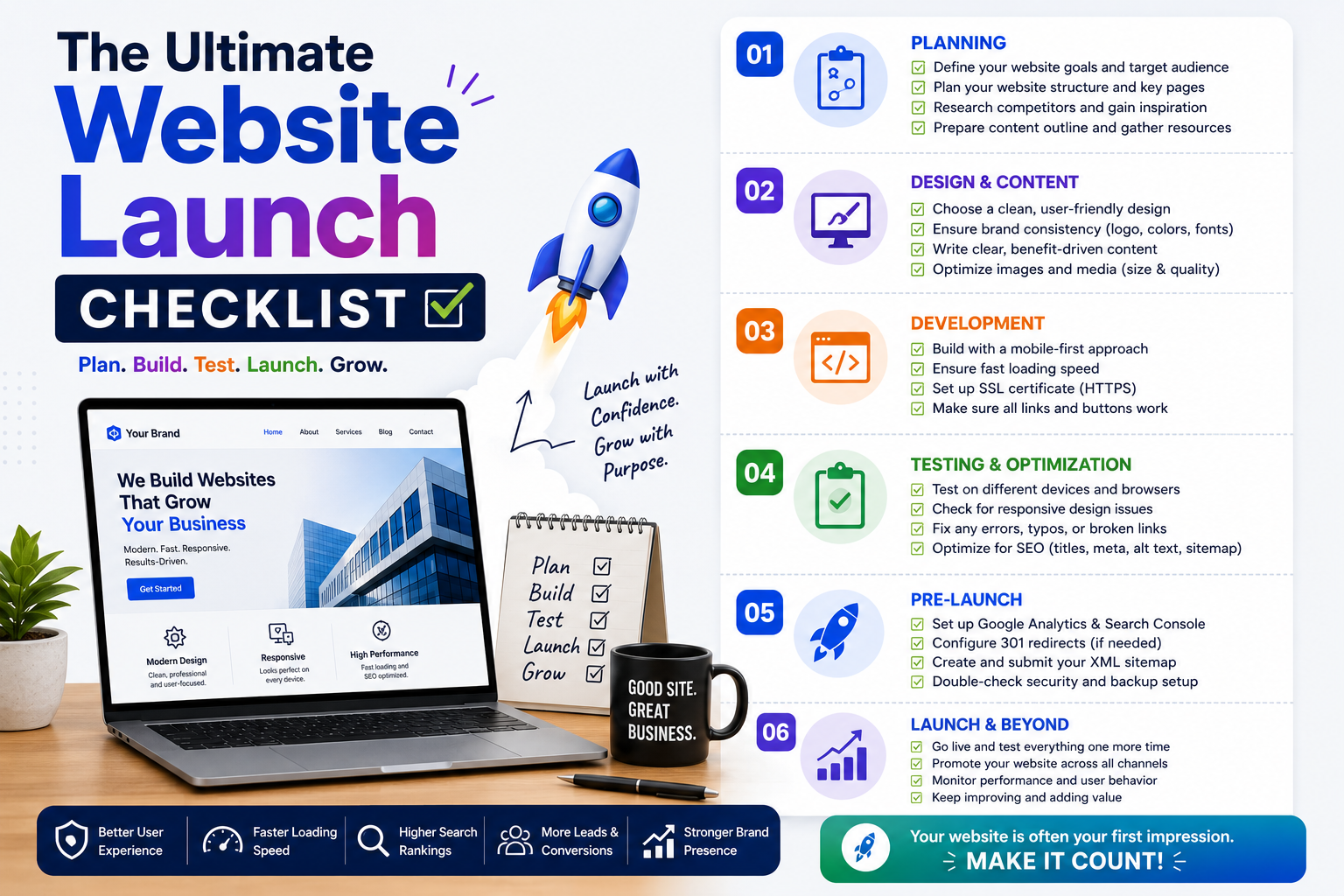
The Ultimate Website Launch Checklist
By a website launch consultant and digital marketing specialist with 10+ years of experience helping small and medium businesses across Gujarat and India launch websites that work from day one.
Hardikbhai had been running his textile export business in Surat since 2011 — first from his father's old godown near the ring road, then from a proper unit in Sachin GIDC. For years he managed entirely through WhatsApp, phone calls, and trade references passed between buyers in Europe and buyers in Bhiwandi. He knew how to run a business. He did not need a website.
Then the buyers started changing. Not the relationships — those stayed warm. But first contact had shifted. New buyers wanted a URL before they would request a catalogue PDF. One German buyer had outright refused to send a purchase enquiry without a website to review first.
So Hardikbhai commissioned a developer, paid ₹28,000, and waited three months. The day the site went live, he sent the link to the German buyer and three other prospects he had been warming up.
Two weeks later, one of them — a buyer from Belgium — clicked the link and received a security warning in their browser: "Your connection is not private." He moved on to a competitor.
It took another week for Hardikbhai to discover the second problem. His website was not appearing in Google search at all. The developer had left a development setting active — a single WordPress checkbox called "Discourage search engines from indexing this site" — that was instructing Google to ignore every page. Three months of waiting. ₹28,000 invested. A site that was both insecure and invisible.
Neither failure was the developer's negligence in bad faith. Both were the natural result of launching a website without a systematic pre-launch process. The developer built the site. Nobody was made responsible for launching it correctly.
This checklist gives you that responsibility — and the tools to fulfil it.
Why the Gap Between "Built" and "Properly Launched" Exists
Most web developers are skilled at building websites. Fewer are equally skilled at the launch process — and the gap between a site that is built and one that is correctly launched is wider, and more consequential, than most business owners realise until they have already paid the price.
What the data shows: According to research by Ahrefs — one of the most widely cited sources in technical SEO — over 60% of newly launched small business websites have at least one significant technical error that reduces their search visibility from day one. Google's Search Central documentation confirms that common launch errors can prevent a website from appearing in search results for weeks or months — not because Google rejected the site, but because the site was inadvertently telling Google to stay away.
For a business investing ₹15,000 to ₹50,000 in a website — which is the realistic range for quality professional work in India — these are not acceptable risks. They are preventable ones.
How to use this checklist: Print it or save it. Share it with your developer at least one week before your planned launch date. Work through every section together, confirming each item before the site goes live. The hour this takes will protect an investment that took months to create.
Part 1: Domain and Hosting — Get the Foundation Right Before Anything Else
I put domain and hosting first because every other item on this list — your SEO, your security, your speed, your analytics — sits on top of these two decisions. A developer building an excellent website on unreliable hosting or a poorly configured domain is doing technically skilled work on a foundation that will undermine it.
Your Domain Name Will Follow Your Business for Years
The domain name is your address on the internet. Your customers will type it, speak it, share it on WhatsApp, print it on business cards, and use it to find you for the foreseeable future. It deserves genuine consideration, not thirty minutes of checking availability.
The principles that consistently hold:
Keep it short. Under 15 characters in the main name is a reasonable guide. Every character added is another character that can be mistyped, misspelled, or forgotten.
Match your business name as closely as possible, without hyphens or numbers. Hyphens in domain names are associated with spam and are impossible to communicate clearly over the phone: "That's help, hyphen, me, hyphen, buddy dot in" is a customer service failure waiting to happen.
Choose the right extension. For businesses primarily serving Indian customers, .in is entirely legitimate and often cleaner than a forced .com. For export businesses or those with international clients, .com remains the stronger credibility signal globally. Avoid .biz, .info, and newer obscure extensions — they carry a credibility disadvantage that is subtle but real, and that experienced buyers notice.
A packaging supplier I worked with in Vadodara deliberated for two weeks between vadodara-packaging-solutions.co.in and vpspackaging.in. They chose the second. Three years later, it fits cleanly on their letterhead, reads clearly in email signatures, and — critically — no customer has ever had to ask them to spell it twice over the phone.
Implementation tip: Before purchasing any domain, run two checks. First, search for the name on trademark databases to ensure it is not in use by another business. Second, paste the domain URL into web.archive.org to see its history — domains that previously hosted spam or low-quality content can carry email reputation damage and link penalties that affect your new site from day one. A clean history is worth paying slightly more for a better domain name.
Domain checklist — confirm before launch:
- Domain registered in your name or your company's legal name — not your developer's personal account
- Auto-renewal enabled on the domain — expired domains are the most preventable website disaster
- Domain privacy protection active — hides your personal contact details from public WHOIS lookups
- You have independent access to the registrar account: your own login, your own password, your own recovery email
- Two-factor authentication enabled on the registrar account
- Professional email address configured using the domain (yourname@yourbusiness.in)
Hosting: The One Infrastructure Decision Where Cheap Costs More
Hosting is where your website files physically live. When a visitor opens your website, their browser sends a request to your hosting server and waits for the files to load. If your server is slow, overloaded, or geographically distant from your users, your website is slow — and a slow website costs you in three compounding ways: visitors abandon it, Google penalises it in ranking, and the investment in design and content is undermined before anyone reads a word.
The most consistent cause of slow Indian business websites I encounter is cheap hosting on servers located outside India — often the United States or Europe. The additional latency this adds to every page request for an Indian visitor is 200 to 400 milliseconds per load. Small in absolute terms. Significant when compounded across every visitor, every page, every day.
Expert insight: Google's Think With Google research has established that 53% of mobile site visits are abandoned if a page takes longer than 3 seconds to load — and that each additional second of load time reduces conversion probability by a further 20%. For a website targeting Indian visitors on mid-range Android devices and variable 4G connections, server location is one of the most impactful performance variables. A server in Mumbai or Singapore eliminates 200 to 400ms of latency that a server in the United States adds to every single page request.
Look for hosting with data centres in India, Singapore, or Mumbai. Look for a 99.9% uptime guarantee or better — anything lower translates to several hours of potential downtime per month. Look for 24/7 support that responds in minutes. A production website failing at 11 PM before a major client presentation is not hypothetical — it happens, and when it does, the quality of your hosting support determines how quickly it is resolved.
Reliable shared hosting in India from reputable providers costs ₹3,000 to ₹8,000 per year. The difference between that and a ₹999 package is server quality, uptime reliability, and support quality. For a business website, this is not the right place to economise.
Hosting checklist — confirm before launch:
- Hosting plan in your name, paid with your own payment method
- Server location in India or Singapore confirmed with your hosting provider
- Website loading speed tested at pagespeed.web.dev — mobile score above 60 before launch
- Staging environment configured — a private copy of the site for testing changes before making them live
- Automatic daily backups enabled and tested (download a backup manually to confirm it works)
- You have independent access to the hosting control panel (cPanel or Plesk) — your own credentials
Part 2: Mobile Responsiveness — Tested on Real Devices, Not Just a Simulator
StatCounter's India internet traffic data shows that over 70% of Indian web traffic comes from mobile devices. This is not a projection of future behaviour — it is the current reality of how your potential customers are reaching you. If your website provides a broken or frustrating experience on a smartphone, you are failing the majority of your visitors before they have read your business name clearly.
Understanding the Difference Between "Works on Mobile" and "Is Designed for Mobile"
These are not the same thing, and the gap between them is where many website launches quietly fail.
A fully responsive website automatically reflows its layout for different screen sizes, presents body text at a minimum of 16px (readable without zooming), spaces interactive elements far enough apart to tap accurately with a thumb, eliminates horizontal scrolling entirely, and loads in under three seconds on a mid-range 4G connection.
A website that "works on mobile" is often just a website that is viewable — technically accessible — but that requires zooming to read, produces tap errors because buttons are too close together, and delivers a frustrating enough experience that visitors leave before taking any action.
The failure modes of poor mobile optimisation are frequently invisible to developers who test on desktop screens. A navigation menu that collapses correctly on an iPhone Pro may break entirely on a Realme 11 — a ₹15,000 phone that a significant portion of your Indian customers are using.
Expert insight: John Mueller, Google's Search Advocate, has stated publicly that Google uses mobile-first indexing for all new websites — meaning Google's crawlers primarily assess your site through a mobile browser. A site that performs poorly on mobile is not just a poor user experience — it is assessed and ranked by Google as a poor experience, which directly affects your search position. Mueller has specifically noted that common mobile failures including small tap targets, unreadable text, and horizontal overflow are issues Google's crawlers actively detect and factor into quality assessments.
How to Test Mobile Responsiveness Properly
Google's Mobile-Friendly Test (search.google.com/test/mobile-friendly) provides a pass/fail result with specific identified issues. Run every key page of your site through this tool — not just the homepage.
Manual testing on physical devices is irreplaceable. Browser developer tools simulate screen sizes but cannot replicate the actual rendering behaviour of real hardware and real operating systems. Test on a mid-range Android device — the Redmi or Realme range represents a very large share of Indian smartphone users and is your most important test environment. Navigate every page as a first-time visitor: read the text, try to tap the navigation, attempt to fill the contact form with a mobile keyboard, and tap the phone number to confirm it dials.
The test I use with clients: hand the phone to someone unfamiliar with the website — a parent, a relative, anyone who is not involved in building it — and ask them to find the contact number and send a WhatsApp message. If they can do both without asking for help, the mobile experience is functioning. If they struggle, you have identified a problem before your launch has cost you real customers.
Mobile responsiveness checklist — confirm before launch:
- Google's Mobile-Friendly Test: passing result on all key pages
- Website tested on at least two physical Android devices (mid-range and budget)
- All interactive elements have tap targets of minimum 44×44 pixels (Google's recommended minimum)
- No horizontal overflow — no content extends beyond screen width on any tested device
- Body text renders at minimum 16px on mobile screens
- Contact form usable with a mobile keyboard — all fields accessible and functional
- Phone number uses a tel: link (tap to dial — confirm it works)
- WhatsApp button is visible, correctly sized, and functional on mobile
- Navigation menu opens and closes correctly on all tested devices
- Images load within 3 seconds on a mid-range 4G connection
Part 3: SEO Basics — Your Google Visibility Is Determined at Launch
Hardikbhai's indexing mistake — the unchecked "Discourage search engines" checkbox — is the most common technical SEO error at launch. I have found this exact setting active on websites that had been "live" for two and three months. It is a default development setting in WordPress that must be manually disabled before launch, and in my experience fewer than half of developers reliably check it.
The broader principle it represents is important: search engine optimisation is not a layer you add after a website is running. It is built into the website structure before it launches. A site that goes live without these basics in place starts life with a deficit that can take three to six months to recover from — and the lost ranking time during those months represents real customers who found competitors instead.
The Technical SEO Items That Cannot Be Left to Chance
The indexing setting — check this first, before anything else.
In WordPress: navigate to Settings → Reading. Look for "Search Engine Visibility." If the checkbox labelled "Discourage search engines from indexing this site" is checked, your entire website is invisible to Google. Uncheck it before launch.
As a secondary verification, type yourdomain.com/robots.txt in your browser. If the file contains Disallow: / covering the entire site, Google's crawlers are blocked. This line should not appear in a production robots.txt file.
XML Sitemap is your website's roadmap for Google — a file listing every page and when it was last updated. WordPress generates this automatically through plugins such as Yoast SEO or RankMath. Once generated, submit the sitemap URL to Google Search Console. This dramatically accelerates the timeline for Google to discover and index your pages.
Page titles and meta descriptions are the two lines of text that appear in Google search results. Every page needs a unique title (under 60 characters) containing your primary keyword and location, and a unique meta description (under 155 characters) that accurately describes the page content and gives the searcher a reason to click.
For Hardikbhai's export business, the homepage title "Surat Cotton and Silk Fabric Exporter | Hardik Textiles" is far more useful than "Home | Hardik Textiles." For a CA firm in Gandhinagar, "GST and Income Tax CA Firm in Gandhinagar | [Name]" will outperform "Home | CA Services" in search relevance for every related query.
H1 heading structure. Each page should have exactly one H1 heading — the primary statement of what that page covers. Google treats the H1 as a primary relevance signal. Subheadings should be H2 and H3, nested logically. This is a structural element that affects both SEO and the accessibility of your site for screen reader users.
Image alt text. Every image on the site should have a descriptive alt attribute — a short sentence explaining what the image shows. This is required for accessibility compliance under India's emerging digital accessibility guidelines, and it is an active search ranking signal that many developers skip.
Implementation tip: Set up Google Search Console (search.google.com/search-console) before launch. It is free, takes 20 minutes to configure, and provides critical visibility into how Google sees your site. After launch, use the URL Inspection tool to verify that your homepage is indexed correctly. If it shows "Page is not indexed," the tool will tell you why and provide a direct path to requesting indexing.
SEO checklist — confirm before launch:
- WordPress "Discourage search engines" setting is OFF (Settings → Reading)
- Robots.txt file does not contain Disallow: / for the full site
- XML sitemap generated (confirm URL: yourdomain.com/sitemap.xml or yourdomain.com/sitemap_index.xml)
- Sitemap submitted to Google Search Console
- Google Search Console property verified for the domain
- Every page has a unique title under 60 characters with primary keyword and location
- Every page has a unique meta description under 155 characters
- Every page has exactly one H1 heading
- All images have descriptive alt text attributes
- No broken internal links — run the site through Screaming Frog's free version or a broken link checker
- URLs are readable and descriptive (yourdomain.com/services rather than yourdomain.com/?p=47)
- 301 redirects configured for any old URLs if this is a relaunch of an existing site
Part 4: Security Setup — Protecting Your Business Before the First Visitor Arrives
A compromised website is not a technical inconvenience — it is a business emergency with compounding consequences. Google blacklists hacked websites and removes them from search results. Browsers display active security warnings that turn away every visitor. Customer data submitted through contact forms can be accessed by attackers. In India, where digital consumer awareness has grown significantly over the past three years, the reputational damage from a security incident is difficult to quantify and harder to reverse.
The good news — and this is genuinely good news — is that basic security setup for a small business website requires under two hours and provides substantial protection against the most common attack vectors.
SSL Certificate: The Absolute First Step
This is what Hardikbhai's Belgian buyer encountered: a missing SSL certificate producing a "Not Secure" browser warning that ended a potential business relationship before it began.
SSL is the protocol that encrypts data between your visitor's browser and your server. It is what produces the padlock icon in the address bar and the https:// prefix in your URL. Without it, every major browser actively warns visitors that the connection is insecure. Google confirmed SSL as a ranking factor in 2014 and has steadily increased its weight since.
Most reputable hosting providers include a free SSL certificate through Let's Encrypt, which is automatically renewable and takes approximately ten minutes to activate. If your provider does not include one, a third-party SSL certificate costs ₹500 to ₹2,000 per year. There is no acceptable reason for a business website to launch without it in 2026.
Verify it yourself: open your domain in a browser. Is there a padlock in the address bar? Does the URL begin with https://? Now type http:// before your domain name — does it automatically redirect to https://? If any of these checks fail, SSL is not correctly installed.
Expert insight: Cybersecurity researcher Troy Hunt, who operates the widely referenced HaveIBeenPwned database and is one of the most cited voices in web security, has documented that small business websites are among the most consistently vulnerable targets precisely because they typically lack basic security hardening — not because attackers specifically target them, but because automated scanning tools identify and exploit common vulnerabilities at scale. Hunt's observation: the businesses that suffer security breaches are almost always the ones that treated security as optional rather than foundational. The most effective security posture for a small business is not advanced — it is comprehensive basics, implemented before launch rather than after an incident.
Security checklist — confirm before launch:
- SSL certificate installed — padlock visible in browser, all URLs begin with https://
- http:// automatically redirects to https:// — test manually by typing http://yourdomain.com
- WordPress (or your CMS) updated to the current latest version
- All installed plugins updated to their latest versions
- All installed themes updated to their latest versions — including inactive themes
- Default "admin" username changed to something non-obvious
- Admin account password is minimum 12 characters: mixed case, numbers, and special characters
- Security plugin installed and configured — Wordfence (free tier) or iThemes Security are both reliable for WordPress
- Login attempt limiting enabled — blocks brute force password attacks after a configurable number of failed attempts
- WordPress admin login URL changed from the default /wp-admin path
- File permissions set correctly — ask your developer or hosting support to verify 755 for directories, 644 for files
- Malware scanning configured on a weekly schedule minimum
- Admin account uses two-factor authentication
Part 5: Analytics Installation — Data From the First Visitor, Not the Hundredth
Here is a pattern I see regularly enough to call it standard: a business owner launches a website, begins driving traffic through social media posts and WhatsApp broadcasts, and three months later has no information about which channel sent which visitors, which pages are working, or why the contact form is not generating enquiries. Every insight that data would have provided — completely lost, because analytics were not installed before the first visitor arrived.
Analytics setup costs nothing and takes a developer 30 minutes. The data it generates from day one shapes every subsequent decision about your website and your marketing.
Google Analytics 4: What It Tells You and Why It Matters
GA4 — Google's current analytics platform — provides detailed visibility into:
- How many people visited your site, on which days, and at which times
- Where they came from: Google organic search, Google Maps, Instagram, direct URL entry, WhatsApp link clicks, or referrals from other sites
- Which pages they viewed and in what sequence
- How long they spent on each page and which pages they left from
- Whether they completed a conversion action: submitting a contact form, clicking your phone number, tapping the WhatsApp button, or viewing a key page
For a manufacturer in Anand that I worked with — running both a Google Business Profile and a new website — the first 90 days of GA4 data showed that 67% of their website traffic was arriving from Google Maps, not from search results or social media. That single insight changed their entire marketing investment — they doubled down on GBP optimisation and review collection rather than the social media content they had been planning to expand. The insight was only available because analytics were running from the first day.
Expert insight: Avinash Kaushik, Digital Marketing Evangelist at Google and one of the most influential authors on web analytics (author of Web Analytics 2.0 and Web Analytics: An Hour a Day), has consistently argued that the most valuable analytics data is the data collected from the beginning of a site's life — because it establishes the baseline against which all improvements are measured. His principle: "You cannot improve what you cannot measure — but more specifically, you cannot measure improvement without a starting point." A website launched without analytics has no starting point, which means every optimisation effort is making changes to an unknown baseline.
Google Tag Manager: Set It Up Now, Thank Yourself Later
Google Tag Manager is a free container that sits between your website and every tracking tool you might ever want to use — Google Analytics, Facebook Pixel, LinkedIn Insight Tag, conversion tracking for specific button clicks. Once GTM is installed on your site, adding future tracking tools requires no changes to your website code. Your developer adds new tags through the GTM interface rather than touching the site itself.
The case for installing GTM at launch even if you only need GA4 right now: every tracking tool you add in the future will require developer time and site modifications if GTM is not already in place. Installing it now is a 30-minute investment that saves hours of future development time.
Analytics checklist — confirm before launch:
- Google Analytics 4 property created in analytics.google.com
- GA4 Measurement ID added to your site (verify using GA4 Real-Time report — visit the site and confirm a session appears)
- Google Tag Manager container installed and publishing correctly
- Conversion events configured: form submission, phone number click, WhatsApp button click
- Google Search Console linked to GA4 (Settings → Property Settings → Search Console Links in GA4)
- Internal traffic filter configured to exclude your own IP address from data
- Day-one baseline report saved: total sessions, top traffic sources, top landing pages
The Final Checks: 24 Hours Before and 48 Hours After
The five main sections cover the strategic items. These final checklists catch the operational details that are easy to overlook and occasionally derail otherwise well-prepared launches.
24 hours before going live — content and function:
- All Lorem ipsum placeholder text removed from every page and post
- All dummy or stock placeholder images replaced with real business photos
- Contact information verified: correct phone number, correct email address, correct physical address
- All phone numbers tap-to-dial correctly on mobile (test manually)
- Contact form submissions tested end-to-end — submit a test enquiry and confirm it arrives in the intended inbox
- All social media profile links open the correct accounts
- All external links open in a new browser tab (not navigating users away from your site)
- Broken link check completed on all internal links (Screaming Frog free version or a browser extension)
- Privacy Policy page present — legally required under India's data protection framework if any visitor data is collected
- Terms and Conditions page present — recommended for all service businesses and e-commerce
- Favicon (small icon in the browser tab) shows your logo, not the default CMS icon
- Website tested in Chrome, Firefox, and Safari on both desktop and mobile
- PageSpeed Insights mobile score is 60 or above
Within 48 hours of going live — verification:
- Google Search Console URL Inspection confirms the homepage is indexed (or submit for indexing if not yet processed)
- GA4 Real-Time report shows active sessions (visit the site yourself to confirm)
- Google Business Profile updated with the live website URL
- All social media profile bios updated with the live website URL
- Email signature updated with the live website URL
- Send the live URL to a trusted contact and ask them to test it on their personal mobile device
- Confirm all post-launch notifications and redirects are working as expected
Conclusion: The Checklist That Protects Your Investment
Three weeks after Hardikbhai's difficult launch — after the SSL was installed, the indexing block corrected, a proper Google Business Profile set up, and the sitemap submitted to Search Console — a buyer from the Netherlands found his website through a Google search for cotton fabric exporters in Surat.
Not a referral. Not a trade fair contact. A completely cold Google search by someone who had never heard of Hardikbhai or his business, finding exactly what they needed, submitting an enquiry through the contact form. His first international lead generated directly by the website.
The site that launched incorrectly became a properly functioning business asset. It just took three weeks of unnecessary delay and one lost Belgian buyer to get there. Had either of these checklist items been verified before the launch date, neither loss would have happened.
A website launch is the most technically dense moment in a business's digital life. Dozens of settings, configurations, and verifications collectively determine whether your investment works from day one or requires weeks of remediation. No developer can be expected to remember all of them without a checklist. No business owner should discover missed items through lost opportunities.
Save this checklist. Share it with your developer. Work through it together in the week before you go live. And treat every unchecked box not as a technicality but as a potential Hardikbhai scenario — a problem that costs something real before anyone realises it exists.
5 — FAQ section (schema-ready)
What should I check before launching a website?
Before launching a website, you should verify five core areas: your domain and hosting configuration (ownership, speed, backups), mobile responsiveness on real devices, basic SEO setup (indexing settings, sitemap, page titles), security setup (SSL certificate, strong passwords, security plugin), and analytics installation (Google Analytics 4 and Search Console). In addition, check all content for placeholder text, test every contact form, and verify that your phone number and WhatsApp button work correctly on mobile.
Why is my website not showing on Google after launching?
The most common reason a newly launched website does not appear in Google is that the "Discourage search engines from indexing this site" setting was left active from the development phase. In WordPress, this is found under Settings → Reading. Check your robots.txt file by visiting yourdomain.com/robots.txt — if it shows "Disallow: /" covering the full site, Google cannot crawl you. Additionally, ensure your sitemap has been submitted to Google Search Console and use the URL Inspection tool to request indexing of your homepage.
How much does website hosting cost in India?
Reliable shared hosting from reputable providers in India costs ₹3,000 to ₹8,000 per year. For Indian business websites, it is important to choose a hosting provider with data centres in India or Singapore to minimise latency for Indian visitors. Avoid the cheapest hosting options (under ₹1,000 per year) — they typically use overloaded shared servers with poor uptime and slow load speeds that negatively affect both user experience and Google ranking.
Do I need an SSL certificate for my website in India?
Yes — SSL is mandatory for any business website. Without it, all major browsers (Chrome, Firefox, Safari) display a "Not Secure" warning that actively turns visitors away, and Google uses SSL as a confirmed ranking factor. Most reputable Indian hosting providers include a free SSL certificate through Let's Encrypt. Activation takes approximately ten minutes. You can verify SSL is working by checking that your website URL begins with https:// and shows a padlock icon in the browser address bar.
How do I make my website mobile-friendly in India?
Test your website using Google's Mobile-Friendly Test (search.google.com/test/mobile-friendly) for an immediate pass/fail result. Then test manually on actual mid-range Android devices — specifically Redmi or Realme models — which represent a large share of Indian smartphone users. Check that text is readable without zooming (minimum 16px), buttons are tappable without errors (minimum 44×44px tap targets), no horizontal scrolling occurs, and the contact form works with a mobile keyboard. Your WhatsApp button should also be visible and functional on every page.
Should I set up Google Analytics before launching my website?
Yes — always install Google Analytics 4 before your website goes live. Once live, your site begins receiving visitors and generating data. If analytics are not installed before launch, that early data is permanently lost. GA4 tells you where visitors come from, which pages they read, how long they stay, and whether they take conversion actions like submitting a form or clicking your WhatsApp button. Installation requires adding a tracking code snippet to your website — your developer can complete this in 20 to 30 minutes.
Launch Your Website Correctly — From Day One
Help Me Buddy IT Pvt Ltd has managed website launches for textile exporters in Surat's Sachin GIDC, manufacturers in Vatva and Changodar, CA firms in Ahmedabad, clinics in Rajkot, and service businesses across Gujarat. Not just building sites — launching them with every item on a checklist like this one systematically verified before the first external link is shared.
Whether you are planning a new website, preparing to launch an existing one, or concerned that a site already live was not properly launched and has been underperforming as a result, we can audit, correct, and properly establish it.
📋 Book a free website launch audit. We will assess your current situation thoroughly — what is correctly in place, what is missing, what needs immediate attention — and give you a specific, honest action plan.
Visit helpmebuddy.in or send us a message on WhatsApp.
Because a website that launches correctly starts generating business from the first day. One that launches with avoidable errors might not reach that point for months — and the opportunities lost in that gap are never recovered.
Comments
Share your thoughts about this post.